
 Lakshan Jayasinghe
Optimizing the Arcadyan AW1000 5G CPE on Airtel Sri Lanka: From 300 to 440 Mbps
I spent a Saturday testing every LTE and 5G band my router would let me lock to. This is what I found, what didn’t work, and the cheap antenna change that turned out to matter more than any of the software I tweaked.
The Setup
My home internet runs off an Arcadyan AW1000 5G CPE with a custom OpenWrt build called NoobWRT flashed onto it (built by nooblk-98 on GitHub, based on OpenWrt 24.10). The AW1000 is a Qualcomm IPQ807x device originally distributed as a Telstra 5G home modem in Australia; the cellular side is handled by a Quectel RG500Q-EA modem module. The SIM is Airtel Lanka, but Sri Lanka’s two big carriers share infrastructure in 2026, so the modem actually reports MCC 413 / MNC 02, which is Dialog’s identifier. The speedtest also calls the ISP “Airtel Lanka.” That’s how it works here.
I’m in Katunayake, on the west coast. Coverage here is decent. There are Band 3 cells at 1800 MHz, some patchy Band 1 at 2100 MHz, and one 5G NR n78 cell at 3500 MHz that does most of the download work. A few weeks back I’d locked the LTE side to Band 3 because the modem was aggregating a weak Band 1 secondary carrier that was killing my upload (it was pegged at 13 Mbps). With the lock, upload went back to a normal 39 Mbps and I left it alone.
So the question I sat down with that morning was just: is my current B3 lock actually the best, or am I leaving real performance on the table?
The Starting Point
First thing I did was SSH in over Tailscale and run a single Ookla speedtest from the router.
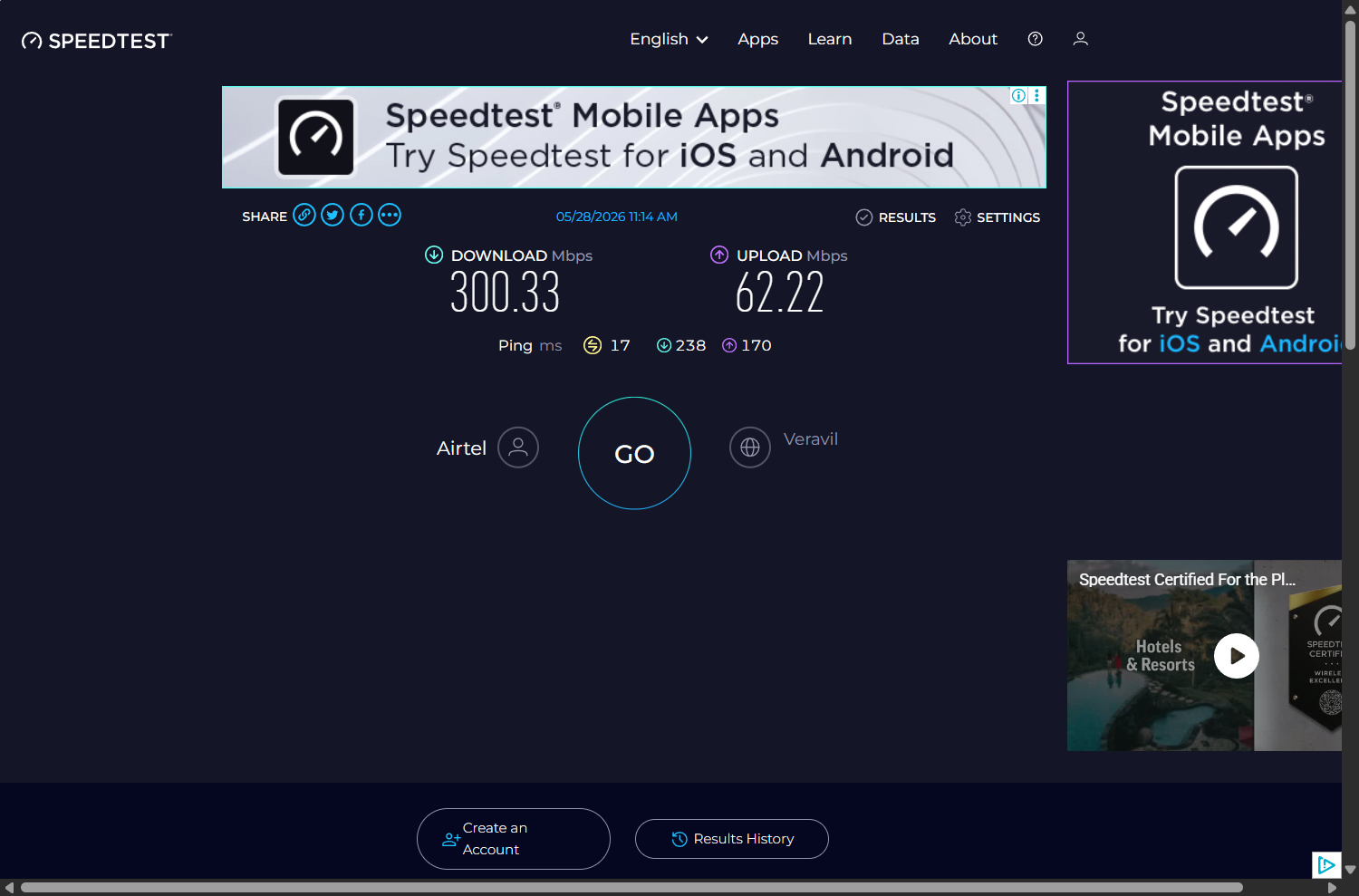
Three hundred down and sixty up. That’s a fine number on paper. The radio looked healthy too: LTE B3 PCI 198 at -92 dBm, 5G n78 PCI 447 at -81 dBm, SINR 30 on the NR. No alarms anywhere.
I figured the only honest way to answer the question was to test every band the modem supports, log everything, and see if there’s a config that beats this. Either I’d find one or I’d at least learn which bands my carrier actually broadcasts at this location, which is information I’d never seen written down.
Sweep #1: Test Everything (and hit a firmware quirk)
The RG500Q-EA supports 18 LTE bands (1, 3, 5, 7, 8, 18, 19, 20, 26, 28, 32, 34, 38, 39, 40, 41, 42, 43) and 13 NR bands (1, 3, 5, 7, 8, 20, 28, 38, 40, 41, 77, 78, 79). The plan was to lock the modem to each one in turn, see if it attaches, run a speedtest, log it, move on.
I wrote a shell script that runs on the router itself, because each time I’d lock to a band the carrier doesn’t broadcast, the WAN would drop and my SSH session would die. The script runs under nohup so it survives the SSH disconnect, and there’s a 90-minute watchdog that restores the original config if anything hangs.
The AT commands the script used for the LTE phase looked like this:
# Lock LTE to band X, force LTE-only mode
AT+QNWPREFCFG="mode_pref","LTE"
AT+QNWPREFCFG="lte_band",X
AT+COPS=2   # detach
AT+COPS=0   # reattach automatically
First band was B1. I knew that one was risky because B1 coverage in my area is spotty. The connection dropped. Fine. Twenty-five seconds later the script should have moved on to B3 (the band I’d been using for weeks) and the link should have come right back up. It didn’t. Forty minutes later, when I checked the log, every single LTE band including B3 had logged NO_ATTACH. Even B3, which I knew worked.
Took me a bit to figure out what was wrong. The value "LTE" for mode_pref isn’t actually accepted by this firmware. The AT command returns OK, the modem accepts it silently, but it doesn’t apply, and then the radio sits there unable to attach to anything. The correct value for LTE-only is "LTE:WCDMA". Cost me eighteen wasted tests and an embarrassing eight-minute stretch where every LED on the router was red and I almost killed the script thinking something worse had happened.
The NR phase did run, sort of. The script tested 13 NR bands as NSA carriers with B3 as the LTE anchor. Every test that ran was technically locked to a different NR band, but AT+QCAINFO kept showing n78 as the actual NR secondary carrier no matter what I’d asked for. The Quectel firmware seems to quietly ignore single-band NR locks under NSA mode when the requested band isn’t acquirable, and just falls back to whatever NR cell it can see. If anyone knows how to make this lock bind properly, please let me know.
Throughput in this phase ranged from 254 to 396 Mbps down and 47 to 66 Mbps up. The spread wasn’t really from the NR band choice though, because as I said the NR side always ended up on n78. It was from the modem reselecting between two different B3 cells. PCI 198 is the strong one (RSRP -91), PCI 447 is the weak one (RSRP -100). About 10 dB difference. When the modem sat on 198 throughput was good; when it slipped to 447, it dropped 30-40 Mbps.
Sweep #2: With the right syntax
I fixed the script. mode_pref="LTE:WCDMA" for LTE-only tests, and I swapped the soft COPS=2/COPS=0 detach for a harder CFUN=0; sleep 2; CFUN=1 radio reset so band changes would actually take effect. Re-ran the LTE phase. This time it worked.
| Band | Channel | RSRP | Cell (PCI) | DL Mbps | UL Mbps | Notes |
|---|---|---|---|---|---|---|
| B1 (2100 MHz) | 2CA: 15+10 MHz | -97 | 78 | 45.3 | 16.7 | The modem aggregates two B1 carriers natively. Best LTE-only result. |
| B3 (1800 MHz) | 20 MHz | -95 | 198 | 29.6 | 14.3 | What I’d been locked to. No CA available on its own. |
| B5 (850 MHz) | 5 MHz | -86 | 201 | 17.8 | 12.8 | Strongest signal of the lot, but only a tiny 5 MHz channel. |
| B8 (900 MHz) | 5 MHz | -88 | 201 | 7.7 | 11.5 | Same cell site as B5. |
| B41 (TDD 2500 MHz) | 3CA: 60 MHz | -110 | 312 | 25.2 | 1.6 | 3-carrier aggregation visible, but the cell is too far. Upload basically died. |
The other 13 LTE bands all failed to attach. That’s actually useful data because it means anyone in a similar area on this carrier mix can skip those 13 bands in the future and save a half hour of testing.
For 5G NR, the only band broadcast at this location is n78. n1, n3, n5, n7, n8, n20, n28, n38, n40, n41, n77, n79 all locked successfully but couldn’t acquire any NR cell. So the 5G story here is just n78.
I wasn’t expecting B1 to be the best LTE-only band. The reason it is, is that B1 here carries two LTE carriers at the same time, 15 MHz and 10 MHz, and the modem aggregates them automatically without me having to tell it to. So locking to B1 gets me 25 MHz of effective LTE bandwidth, whereas locking to B3 only gets me 20 MHz on a single carrier. None of these LTE-only numbers compete with what the 5G link does of course, because the NR side carries most of the throughput on a real connection. But it changed which LTE anchor I wanted to test against B3 for the NSA configs.
Sweep #3: Carrier aggregation combinations
Next batch tested a bunch of CA combos:
| Config | DL Mbps | UL Mbps | Notes |
|---|---|---|---|
| LTE B1+B3+B5+B8 (no NR) | 61.2 | 21.2 | Modem picked B1 intra-CA + B5. Ignored B3 and B8. |
| LTE B1+B3 (no NR) | 44.9 | 17.8 | B3 not aggregated. Just B1 alone. |
| LTE B3+B5 (no NR) | 31.0 | 11.9 | B5 not aggregated either. |
| LTE B3+B8 (no NR) | 21.6 | 8.8 | B8 actually was aggregated this time, and it dragged performance below B3 alone. |
| B1 + n78 NSA | 405.1 | 66.6 | The surprise. Beat my current B3+n78 setup. |
| B1+B3 + n78 NSA | 329.8 | 56.4 | Adding B3 to B1 didn’t help. |
| B1+B3+B5+B8 + n78 NSA | 343.6 | 54.9 | Adding everything didn’t help either. |
Two things came out of this. One, adding extra LTE bands as secondaries is usually counterproductive on this carrier here. The modem either ignores them or, worse, aggregates a weak secondary cell that drags upload (which is the exact problem I’d had a year ago when B1 was an SCC on a B3 anchor). Two, B1 plus n78 in NSA hit 405 down, 67 up, in a single test. My current B3 plus n78 setup had been averaging around 333 down. So either B1 anchor is genuinely better, or that 405 was just a high sample.
The only way to tell was to run a proper A/B.
The A/B test (pre-antenna)
Wrote a fourth script. Five runs of B1+n78, five runs of B3+n78, alternating, hard radio reset between each one, Ookla speedtest after every successful attach. Ten tests in about nine minutes.
| Metric | B1 + n78 | B3 + n78 | Winner |
|---|---|---|---|
| DL mean | 319 Mbps | 301 Mbps | B1 by 6% |
| DL range | 261 – 352 | 270 – 333 | — |
| UL mean | 66.8 Mbps | 56.8 Mbps | B1 by 18% |
| UL range | 61.8 – 71.6 | 55.4 – 58.5 | — |
So the 405 from the single sample was a high outlier (the real ceiling across five samples was about 352). But the broader picture held up. B1 beat B3 on upload by about 10 Mbps in every single sample, with zero overlap between the ranges. That’s a pretty clean result for five samples each.
Why B1 wins upload here, I’m not entirely sure. The wider 25 MHz aggregated channel helps, and the B1 cell PCI 78 just seems to have better upload conditions than the B3 cell at this location for reasons that don’t fully show up in the raw SINR. Could be cell-side scheduling, could be antenna pattern.
Going by this data alone the decision was clear: switch to B1 + n78. But before I did, there was something else I wanted to fix first.
About the antenna
A few weeks before this session I’d run AT+QRSRP on the modem, which gives you per-receive-path RSRP readings. The numbers looked off:
# Pre-upgrade, on LTE B3:
+QRSRP: -98, -94, -107, -94, LTE
That’s RX0 = -98, RX1 = -94, RX2 = -107, RX3 = -94 dBm. The RG500Q-EA module has four receive antennas inside (RX0 through RX3), but only RX0 was connected to my external antenna. The other three were using whatever tiny internal antennas the module ships with. On the NR side the spread was 22 dB between the best and worst RX path.
This matters because LTE and 5G NR both use spatial multiplexing to push high throughput. The Quectel module uses RX0 and RX1 for LTE 2×2 MIMO, and all four for NR 4×4 MIMO. If one of the LTE RX paths is hearing the cell 22 dB worse than the other, MIMO can’t really work properly. The modem ends up acting more like a single-stream 1×1 link, which caps your throughput at roughly half what 2×2 should give you.
So I dug out a 4G LTE omni antenna I’d bought off Daraz a while back but never gotten around to connecting, and plugged it into the RX1 port. I didn’t touch the 5G antenna (a separate unit I’d picked up off Facebook Marketplace a few months ago) since RX0 on the NR side was already healthy at -83.
After the antenna
I checked per-RX again once the modem reattached on B3 PCI 198:
# Post-upgrade, on LTE B3 PCI 198:
+QRSRP: -88, -93, -32768, -32768, LTE
RX0 -88, RX1 -93. The -32768 values for RX2/RX3 just mean “not measured” because the firmware only uses two RX paths for LTE on this module. The number that mattered: the RX0/RX1 gap went from 22 dB to 5 dB.
What actually moved the throughput needle though wasn’t the RSRP itself. It was CQI. CQI (Channel Quality Indicator) is the modem’s estimate of how good the channel is, scored 0 to 15. Pre-antenna it was sitting at 5-7. Post-antenna it jumped to 12. A CQI of 12 means the modem can use 256-QAM modulation; 5-7 means it was stuck at 64-QAM. 256-QAM packs 33% more bits per symbol than 64-QAM, so for the same channel bandwidth you get noticeably more throughput.
A/B test, round two
Re-ran the same A/B with the new antenna in place. Same script, five samples each, alternating B1+n78 and B3+n78.
| Run | B1 PCI | B1 DL | B1 UL | B3 DL | B3 UL |
|---|---|---|---|---|---|
| 1 | 423 | 381.2 | 65.8 | 441.7 | 56.4 |
| 2 | 78 | 427.0 | 53.1 | 390.9 | 59.0 |
| 3 | 423 | 374.8 | 65.3 | 366.3 | 56.1 |
| 4 | 423 | 426.6 | 67.6 | 400.1 | 60.7 |
| 5 | 78 | 373.6 | 67.0 | 434.5 | 58.9 |
| Mean | — | 396.6 | 63.8 | 406.7 | 58.2 |
The picture flipped a bit. B3+n78 went from 301 Mbps mean pre-antenna to 407 Mbps mean after. That’s +106 Mbps from one antenna change. B1+n78 also improved, but only to 397 from 319, so +78. B3 benefited more, probably because B3 is at 1.8 GHz which is closer to where the cheap omni antenna is best tuned, while B1 is at 2.1 GHz.
On upload, B1 still beat B3, but the gap shrank to 6 Mbps (10%) from the previous 10 Mbps (18%). And there’s a wrinkle: when I locked the modem to B1, it sometimes camped on PCI 78 (with the 2CA) and sometimes on PCI 423 (no CA at all). The numbers for B1 swing wider as a result. B3 was rock-stable on PCI 198 every single time.
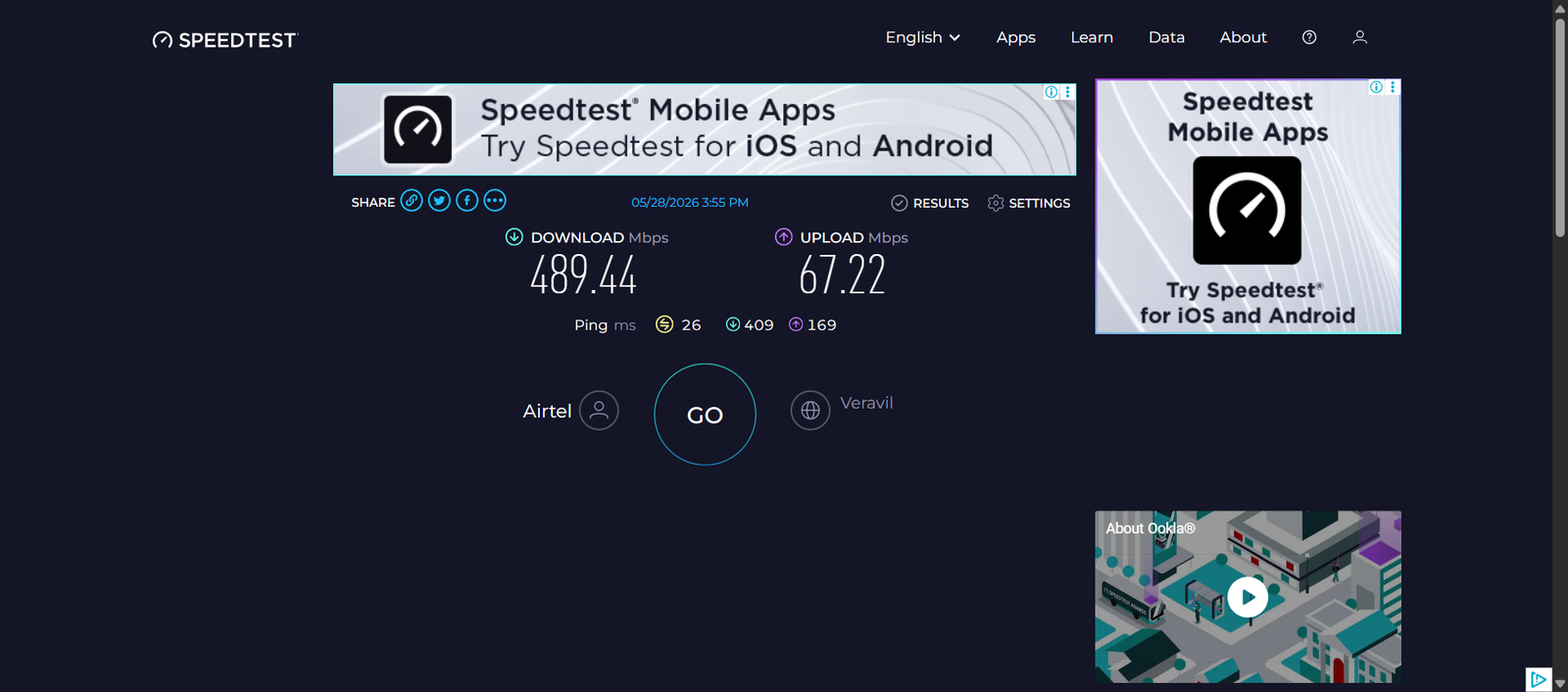
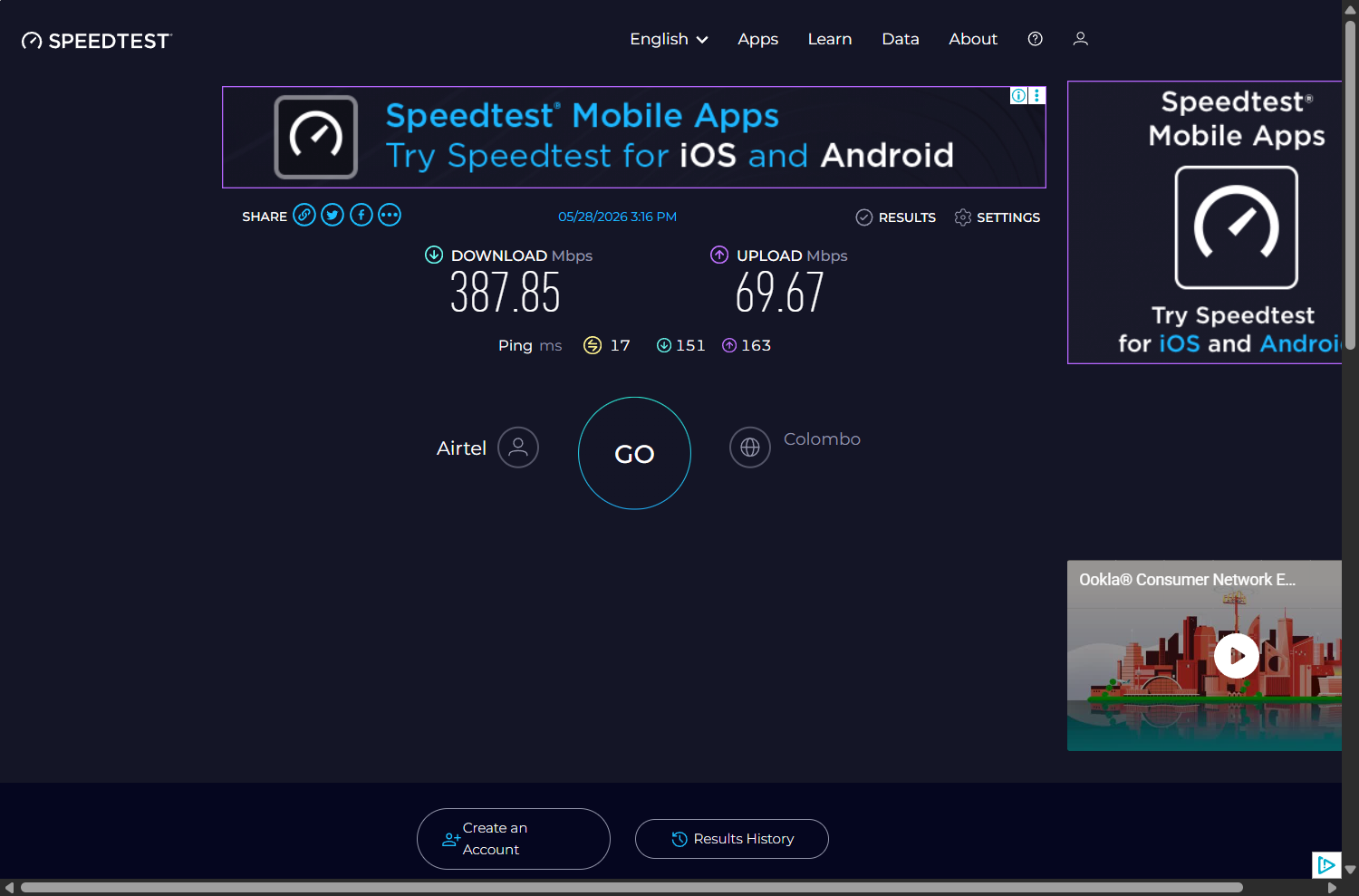
So which to pick. If you really care about upload, B1+n78 still wins, slightly. If you want consistency, B3+n78 wins because it sits on the same cell every time and the DL is actually a touch higher in the mean. I went with B3+n78 because I value consistency more than 6 Mbps of upload, and because B3 was already what my UCI config persisted across reboots.
What made the difference
Morning baseline: 300/62. After everything: 380-440 / 60-70 routinely, with a peak of 489/67 in the late afternoon. That’s about a 35% improvement on download and 10% on upload, sustained.
Where did the gains come from?
| Change | DL impact | UL impact | Cost |
|---|---|---|---|
| Staying on the strong B3 cell (PCI 198) instead of the weak one (PCI 447) | +30 when on good cell vs bad | ~0 | $0 |
| LTE locked to B3 (the earlier decision) | ~0 | +26 (vs default that grabbed weak B1 SCC) | $0 |
| Second external antenna on RX1 (a spare 4G omni) | +106 | +5 | — |
| Band choice (B1 anchor vs B3 anchor post-antenna) | ±10 | ±6 | $0 |
The antenna was by far the biggest lever. All the band locking and CA configuration combined moved download by maybe ±20 Mbps. The antenna alone moved it by +106. If you only do one thing to your CPE, do the antenna.
For anyone else doing this in Sri Lanka
If you have a Quectel-based 5G CPE (RG500Q, RM502Q, RM520N etc.) on Airtel/Dialog in Sri Lanka, especially the western coastal belt, here are the band lists from my location so you can skip half the testing I did:
| Type | Broadcast at this location | NOT broadcast (skip) |
|---|---|---|
| LTE | B1, B3, B5, B8, B41 (distant) | B7, B18, B19, B20, B26, B28, B32, B34, B38, B39, B40, B42, B43 |
| 5G NR | n78 only | n1, n3, n5, n7, n8, n20, n28, n38, n40, n41, n77, n79 |
Practical notes:
- Lock LTE to B3 (or B1). The all-bands-allowed default tends to pick up a weak B1 secondary that drags upload, which is what happened to me in 2024.
- If your CPE supports n28 or n41 or 5G SA, none of that matters here. Only n78 is deployed and SA isn’t active at all on this network at my location as of mid-2026.
- The cheapest big upgrade is a second LTE antenna on the RX1 port. Even a basic 4G omni picked up the modem’s MIMO from broken to working and gained me about 100 Mbps download.
- Run
AT+QRSRPto check per-receive-path RSRP. If RX0 and RX1 are more than 10 dB apart your MIMO is broken and a second antenna will help a lot.
The commands, if you want to try this
Minimum useful AT vocabulary for anyone with a Quectel modem on OpenWrt:
# See what bands your modem currently allows
AT+QNWPREFCFG="lte_band"
AT+QNWPREFCFG="nr5g_band"

# Lock LTE to band 3 (or any single band)
AT+QNWPREFCFG="lte_band",3

# Lock NR to n78
AT+QNWPREFCFG="nr5g_band",78

# Allow LTE only (NOTE: just "LTE" fails silently. Use "LTE:WCDMA")
AT+QNWPREFCFG="mode_pref","LTE:WCDMA"

# Allow 5G NSA (LTE anchor + NR secondary)
AT+QNWPREFCFG="mode_pref","NR5G:LTE"

# Hard radio reset so new config takes effect
AT+CFUN=0
AT+CFUN=1

# Current carrier aggregation state
AT+QCAINFO

# Per-RX RSRP (the MIMO health check)
AT+QRSRP
AT+QSINR

# Serving cell info
AT+QENG="servingcell"
On OpenWrt with the qmodem package, you can send AT commands easily using sms_tool:
sms_tool -d /dev/ttyUSB2 at 'AT+QCAINFO'For the speedtest part, install the official Ookla CLI (the Python clone is less accurate):
opkg install ookla-speedtest
ookla-speedtest --accept-license --accept-gdpr -f json -p no
Wrap that in a loop over the bands you want to test and you have a working version of what I ran.
Mistakes I made
- The
mode_pref="LTE"thing. Eighteen wasted tests and an eight-minute WAN outage. Fix is"LTE:WCDMA". - Trusting
COPS=2/COPS=0as a clean detach/reattach. It’s not reliable for band changes.CFUN=0; sleep 2; CFUN=1is better. - Calling B1+n78 the winner after one sample of 405. Five samples later the mean was 397 and the range was huge. Cellular throughput is too noisy to call a winner on a single test.
- Assuming the NR band lock would force the modem to use only that band. It didn’t. The Quectel firmware seems to treat
nr5g_bandas more of a hint than a constraint under NSA. I never solved this. - This one’s embarrassing. Ookla CLI reports the
bandwidthfield in bytes per second. To get Mbps you multiply by 8 then divide by a million. I forgot the ×8 step when eyeballing the JSON early in the session and briefly convinced myself the link was running at 38 Mbps, when it was actually 300. Always check your unit conversion. The script computed Mbps correctly using awk. Only my eyeballs were wrong.
Closing
If I’d just plugged the spare 4G antenna in a year ago and never run any of these sweeps, I’d probably be in roughly the same place I am now. The sweeps were fun and they gave me a lot of data, and the dead-band lists are useful, but the antenna alone did most of the work.
If you’ve got a 5G CPE in Sri Lanka and you’ve never opened the AT interface, you’re probably fine on defaults. But run AT+QRSRP once. If your per-RX numbers look like mine did, a spare LTE antenna fixes a problem you didn’t know you had.
If you do try any of this, send me your numbers. The dead-band lists especially are location-specific and it would be interesting to crowdsource them across the country.


Add comment